
Fill Your Membrain Pipeline in Seconds
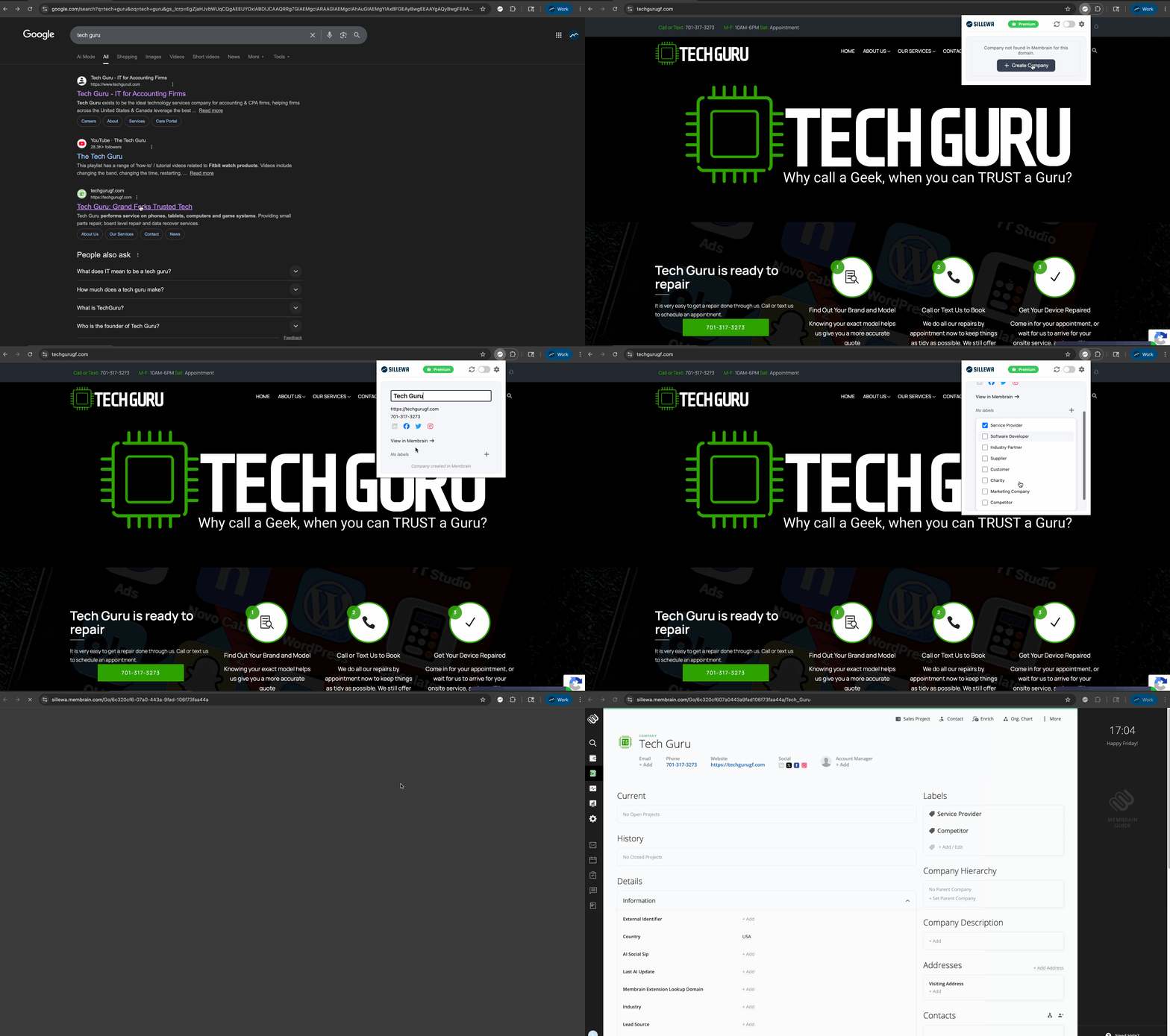
Turn any website into a lead in one click.
Scrape, label, and sync details directly to Membrain to eliminate data entry busywork.
A Complete Prospecting Workflow in Your Browser
Capture Rich Data
Instantly capture data about your leads. Pull company details, social profiles, and contact info with one click.
Qualify Instantly
Quickly label companies to trigger Membrain workflows. Automatically route leads or start email sequences.
Prevent Duplicates
Smart detection checks Membrain before adding. If a record exists, we'll update it instead of creating a mess.
Safe, Secure, and Built for Membrain
Everything You Need to Get Started
Is the extension really free?
Yes! Our Free Forever tier is generous enough for most daily workflows.
- Daily Free Credits: You get 5 credits every day to create new records (that’s ~150 free leads a month!).
- Unlimited Maintenance: Scrape and update companies already in Membrain as much as you want—it never costs a credit.
- Go Unlimited: Need to scale faster? Upgrade to the Premium Plan for $4.99/month or $49.99/year to unlock unlimited new record creations.
How do I set up the extension?
1. Finding Your Membrain URL
The URL is your company's specific Membrain instance address without the https. You can find the URL in the address bar of your browser when you are logged into Membrain (e.g., yourcompany.membrain.com).
2. Finding Your API Key
You will need Administrator access in Membrain to retrieve or generate an API key.
- Log in to Membrain
- Click on your Profile Picture (usually bottom left) and select System Setup
- Scroll down to the section titled Membrain API, Forms, Beacon, Automations & Data Clean Up
- Click on Membrain API
- Look for the API Keys section. You may need to generate a new key if one is not already listed for this integration
- Copy the long string of characters—this is your API Key
3. Final Step
Once you have pasted the URL and API Key into the setup window, click the "Resync Labels" button. This will authenticate the connection and pull your labels over.
How does this help me automate my work?
- Instant Lead Capture: Turn on the "Auto-Add" slider to automatically capture lead data the moment you open the extension.
- Real-Time Updates: Use the Quick Edit and Resync features to modify fields or refresh page data instantly.
- Workflow Triggers: Set up automations using Membrain Flow that launch specific actions based on the labels you select for a user.
Hint: You can set up automations using Membrain Flow based on the labels users select. Connect with us if you need help configuring them.
Is my data secure?
Yes, your data is not stored on any external servers and we've taken extra steps to ensure your data stays with you.
- Direct Communication: The browser extension communicates strictly between your browser and Membrain and does not transmit data to any other servers.
- Google Verified: The extension has been fully audited, reviewed, and approved by Google prior to its release on the Web Store, ensuring strict security compliance.
- Local Storage: Your API key is stored locally within your browser and is never shared between devices.
- Secure Tunneling: All lead data is sent directly from your browser to your instance of Membrain.
If you have any concerns about security or data privacy, see our Privacy Policy.
Which browsers are supported?
The extension works on any Chromium browser.
- Optimized For: Google Chrome.
- Fully Compatible: Microsoft Edge, Brave, and Opera.